


CRM SOLUTIONS • MADISON, WI
CRM Solutions for Madison, WI Businesses
Madison Media Services helps businesses evaluate, configure, and improve customer relationship management systems that organize leads, track customer interactions, support sales follow-up, and connect the tools used across the customer journey.
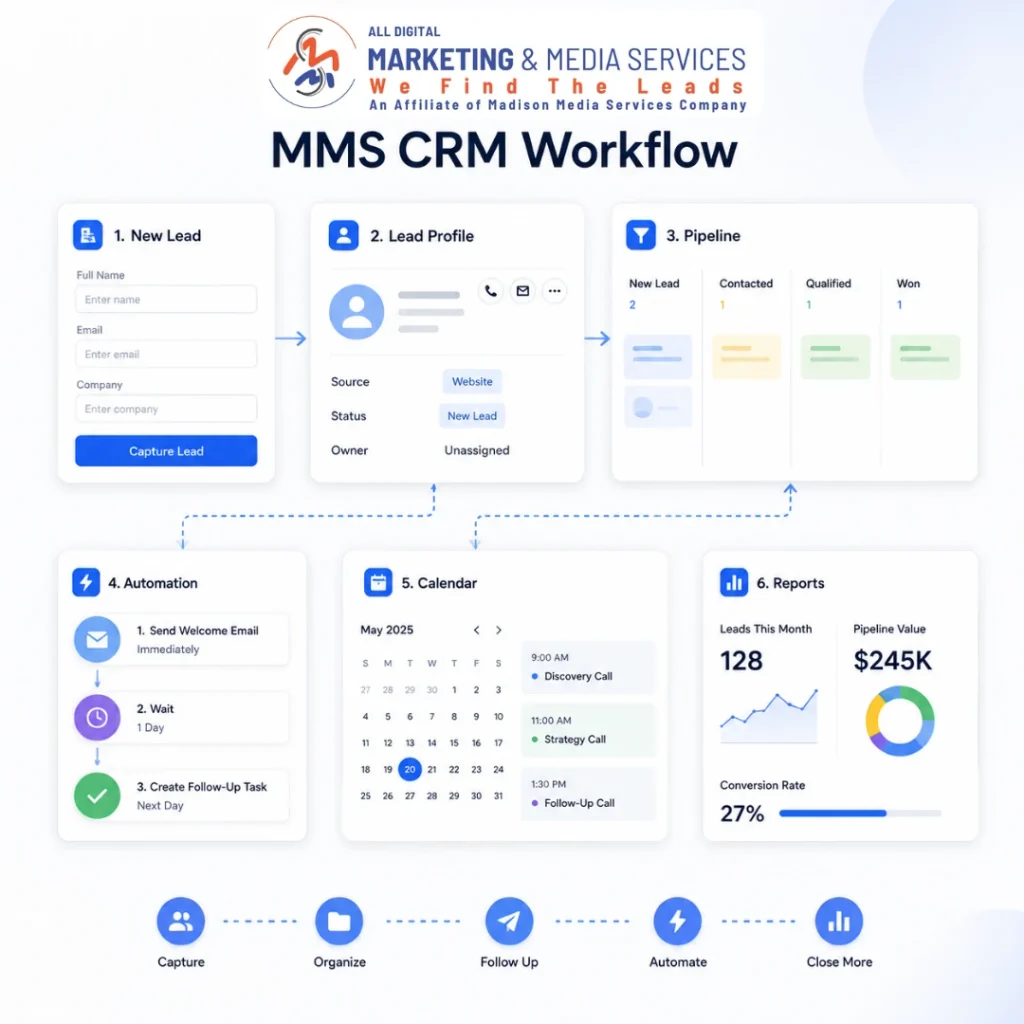
Instead of forcing your team into a generic software setup, we start with how leads actually enter the business and what should happen next. Then the CRM can be built around pipeline stages, ownership, follow-up, scheduling, communication, and reporting.
Madison-Focused Strategy
Lead + Pipeline Management
Workflow Automation
CRM Integrations
CAPTURE + ORGANIZE + FOLLOW UP + IMPROVE
Turn Customer Follow-Up Into a Defined System
01
Capture
Bring leads and customer details into one organized workflow.
02
Manage
Track ownership, pipeline stages, activity, and next actions.
03
Automate
Use approved follow-up, reminders, scheduling, and notifications where they fit.
LEADS + PIPELINE
FOLLOW-UP + AUTOMATION
WHAT CRM SOLUTIONS INCLUDE
What Does a CRM System Actually Do for a Business?
A CRM gives a business one structured place to manage customer and prospect information, track interactions, organize opportunities, and coordinate follow-up.
For example, a new website inquiry can enter the CRM, receive an owner, move into a pipeline stage, trigger an approved follow-up task, and remain visible until the next action occurs. As a result, customer information is less dependent on scattered inboxes, spreadsheets, or individual memory.
01
Contact & Lead Management
Keep prospect and customer details, activity, ownership, notes, and status in a more organized system.
02
Sales Pipeline Tracking
Define the stages a lead moves through so the team can see what is open, what is waiting, and what needs attention.
03
Follow-Up Automation
Use approved reminders, emails, texts, tasks, scheduling, or other workflows to support consistent follow-up where the platform allows it.
04
Integrations & Reporting
Connect forms, calendars, email, phone, marketing, or other systems and review the data needed to manage the customer journey.
CUSTOMER DATA NEEDS A SYSTEM
More Leads Do Not Help If Follow-Up Is Disorganized.
Many growing businesses reach a point where email inboxes, spreadsheets, sticky notes, calendars, and individual memory are no longer enough to manage every prospect and customer relationship.
Instead of adding another disconnected tool, a CRM should create a shared process. More importantly, the team should be able to see who owns the opportunity, what happened last, what happens next, and where the customer sits in the pipeline.
CAPTURE IT. OWN IT. FOLLOW UP.
01
Leads Arrive From Different Places
Website forms, calls, ads, email, referrals, and social messages can create separate follow-up paths.
Without a common system, one employee may own an inbox while another tracks calls in notes. Therefore, the business can lose visibility into who is responsible for the next step.
02
Follow-Up Becomes Inconsistent
Good intentions are not the same as a repeatable process.
A salesperson may remember to call one lead but forget another during a busy week. By contrast, a CRM can assign tasks, stages, reminders, and approved automation to support more consistent follow-up.
03
Customer History Gets Scattered
Important context often lives across several tools and people.
Past emails, calls, notes, estimates, appointments, and status changes can become difficult to reconstruct. A better CRM process gives the team a clearer record of what already happened.
04
Software Alone Does Not Fix the Workflow
Buying a CRM does not automatically make the team use it well.
Because every company handles customers differently, fields, stages, permissions, automations, and integrations need to reflect the real process. Otherwise, the CRM becomes another system employees work around.
CRM STRATEGY + IMPLEMENTATION
The Right CRM Should Fit the Customer Journey You Already Need to Manage.
The current MMS CRM page compares several popular CRM platforms and specifically highlights lead management, interaction tracking, automation, appointment scheduling, personalized communication, and integrations. The redesigned page keeps those supported capabilities while putting the workflow ahead of the software.
Therefore, the first question is not “Which CRM has the most features?” It is “Which system can support the way this Madison business attracts, serves, and follows up with customers?”
01
CRM Platform Evaluation
Choose the system around the workflow instead of the brand name.
MMS currently discusses platforms such as Salesforce, HubSpot, Zoho, Microsoft Dynamics 365, Pipedrive, Freshsales, and OneTrack/HighLevel. However, platform capabilities and pricing change, so the recommendation should begin with business requirements.
02
Pipeline & Stage Design
Define how opportunities move from inquiry to the next business outcome.
Pipeline stages can reflect qualification, contact attempts, appointments, proposals, decisions, onboarding, or other real steps. Therefore, reporting becomes tied to the actual sales process.
03
Contact & Activity Management
Give employees a more complete view of the relationship.
Contact records can organize ownership, notes, communication history, tasks, status, source, and other approved fields. In addition, teams can reduce the amount of customer context stored only in personal inboxes.
04
Workflow Automation
Use automation for repeatable actions instead of replacing human judgment.
Automations may support reminders, follow-up, appointment scheduling, notifications, status changes, or personalized communication when the selected platform and workflow allow it. Meanwhile, unusual or sensitive situations should remain with people.
05
Forms, Calendars & Communication Connections
Connect the systems customers already use to reach the business.
Website forms, scheduling tools, email, phone, AI answering, and marketing systems can often feed the CRM through supported integrations. As a result, the customer journey becomes easier to track across channels.
06
Reporting, Training & Optimization
Help the team understand the system after launch.
A CRM is more useful when employees know what to enter, when to update stages, how to follow tasks, and which reports matter. Consequently, training and ongoing workflow review are part of successful adoption.
ONE
PIPELINE
FROM LEAD SOURCE TO CUSTOMER HISTORY
A CRM Becomes More Valuable When the Systems Around It Connect.
A Madison business may generate inquiries through Google Ads, organic search, social media, email, phone calls, referrals, or an AI answering assistant. If each source creates a different follow-up process, managers may struggle to see the full pipeline.
By contrast, a connected CRM can become the organizing layer between marketing and sales. Then the team can track the source, owner, current stage, follow-up activity, appointment status, and eventual outcome more consistently.
Lead Capture
Bring new inquiries into a defined system.
Website forms, calls, ads, referrals, email, and AI answering can create different entry points. When supported, those sources can feed a shared lead-management process.
Follow-Up
Make the next action easier to see and assign.
Pipeline stages, owners, tasks, reminders, scheduling, and approved automation can help the team maintain momentum without relying entirely on memory.
Customer History
Keep context available after the first conversation.
Notes, status changes, communication, appointments, and other approved activity can give employees a clearer view of the relationship when the customer returns.
HOW CRM IMPLEMENTATION WORKS
From Customer Journey Mapping to a Working CRM
A CRM project should begin with the business process, not a list of software features. First, the team needs to understand where leads come from, how opportunities move, who owns follow-up, and which systems already hold customer information.
Then the platform can be selected and configured around a workflow employees can realistically maintain.
01
Map the Customer Journey
Document what happens from first inquiry through follow-up and beyond.
First, we identify lead sources, qualification, ownership, communication, appointments, proposals, sales steps, customer onboarding, current tools, and the points where information is commonly lost.
02
Define Requirements
Decide what the CRM must support before comparing platforms.
Next, we document users, roles, fields, pipeline stages, automations, communication needs, calendars, reporting, integrations, permissions, and other operational requirements.
03
Select the Platform
Choose a CRM that fits the requirements and realistic budget.
Platform options are compared against the workflow instead of relying on a universal ranking. Because CRM products evolve, current pricing, limits, integrations, and plan features should be verified during selection.
04
Configure the System
Build the contacts, fields, stages, ownership, and workflow structure.
The approved CRM is configured around the real process. In addition, unnecessary fields and overly complex stages should be avoided when they do not help employees act or report.
05
Connect the Tools
Integrate forms, calendars, email, phone, marketing, or other supported systems.
Connections are added according to the approved scope and platform capabilities. Therefore, customer information can move through a more coordinated workflow instead of repeated manual entry.
06
Test & Train
Make sure employees can use the system before relying on automation.
Test records, pipeline movement, assignments, notifications, scheduling, automations, integrations, and reporting are reviewed. Meanwhile, staff training clarifies who updates what and when.
07
Improve the Workflow
Use real team behavior and pipeline data to refine the system.
Finally, unused fields, confusing stages, missed tasks, automation problems, reporting gaps, and new business needs can guide future adjustments. As a result, the CRM evolves with the operation instead of becoming frozen at launch.
WHAT A BETTER CRM SHOULD SUPPORT
What Should a Better CRM System Actually Improve?
A CRM cannot guarantee sales, response time, close rate, revenue, customer retention, or employee adoption. Those results depend on the team, process, offer, lead quality, training, platform limits, and how consistently the system is used.
Instead, a well-designed CRM should improve the areas the business can influence directly: organization, visibility, follow-up consistency, workflow efficiency, customer history, and decision support.
01
Organization
Centralize customer and prospect information more consistently.
A shared CRM can reduce reliance on disconnected spreadsheets, personal notes, and individual inboxes for important customer details.
02
Visibility
Help managers and employees see what needs attention next.
Pipeline stages, ownership, tasks, and status information can make open opportunities easier to review. Therefore, follow-up gaps become easier to identify.
03
Consistency
Support a more repeatable follow-up process.
Reminders, tasks, approved automation, templates, and workflow rules can help teams handle similar situations more consistently without removing human judgment.
04
Efficiency
Reduce duplicate entry and manual coordination where integrations fit.
Connected forms, calendars, communication tools, AI answering, and marketing systems can reduce some repetitive work. However, integrations still need testing and ownership.
05
Decision Support
Use pipeline and activity data to ask better operational questions.
CRM reporting can help reveal lead sources, stage movement, open opportunities, follow-up activity, and other process signals when data is entered consistently and interpreted carefully.
PLANNING YOUR CRM PROJECT
What Determines the Cost of CRM Implementation in Madison, WI?
CRM implementation cost depends on the platform, number of users, pipeline complexity, data migration, automation, integrations, reporting, training, and the amount of process design required before configuration begins.
For example, a Madison service company moving a clean contact list into one sales pipeline has a different scope than a multi-location business combining several legacy systems, departments, automations, and reporting requirements.
IMPLEMENTATION FACTOR
MORE FOCUSED SCOPE
ADDS MORE SCOPE
Number of Users
A small team has a clear set of roles and a manageable number of CRM users.
Larger teams, multiple departments, territories, permission levels, or frequent user changes can increase configuration and training needs.
Pipeline Complexity
The business uses one straightforward sales or customer pipeline.
Multiple services, locations, sales teams, customer types, renewal processes, onboarding flows, or specialized stages can require more workflow design.
Data Migration
Contacts and opportunities are already organized in clean, usable data.
Duplicate records, inconsistent fields, old spreadsheets, missing ownership, several legacy systems, or complex historical data increase cleanup and migration work.
Automation
The CRM uses a focused set of reminders, tasks, notifications, and follow-up workflows.
Complex branching, many triggers, multi-step sequences, personalized communication, scoring, or cross-system automation add testing and maintenance.
Integrations
The business needs a limited number of supported connections.
Custom APIs, multiple websites, phone systems, accounting tools, marketing platforms, AI systems, or specialized software can expand technical scope.
Reporting
Managers need a practical set of pipeline and activity views.
Custom dashboards, attribution, multiple business units, forecasting, advanced analytics, or external data sources can require more reporting work.
Training & Change Management
A small team can adopt one clear process with focused training.
Larger organizations, inconsistent current processes, multiple managers, extensive documentation, or ongoing coaching add implementation and adoption support.
COMMON CRM QUESTIONS
Questions Madison Businesses Ask Before Choosing a CRM
CRM projects create practical questions about platforms, data migration, integrations, automation, user adoption, and what results software can realistically support. These answers clarify the main decisions before implementation begins.
Platform, Data & Follow-Up
What is a CRM and why would a Madison business need one?
CRM stands for Customer Relationship Management. A CRM helps organize prospect and customer information, interactions, opportunities, tasks, pipeline stages, and follow-up in one structured system.
For a growing Madison business, that can become useful when spreadsheets, shared inboxes, calendars, and individual memory no longer provide enough visibility.
Which CRM platforms can Madison Media Services help evaluate?
The current MMS CRM page discusses Salesforce, HubSpot CRM, Zoho CRM, Microsoft Dynamics 365, Pipedrive, Freshsales, and OneTrack/HighLevel.
However, platform features, pricing, and integrations change. Therefore, the final recommendation should be based on current requirements and verified plan details rather than an old feature comparison.
Can you migrate contacts from spreadsheets or another CRM?
Potentially. Data migration can include contacts, companies, opportunities, statuses, ownership, notes, or other supported records depending on the source and destination systems.
Before importing, the data should be reviewed for duplicates, missing fields, inconsistent formatting, ownership, and information that should not be carried into the new system.
Can a CRM automate lead follow-up?
Yes. The current MMS CRM page specifically highlights automation for follow-ups, appointment scheduling, and personalized communication.
Still, automation should be designed around approved business rules. Sensitive, unusual, or high-value conversations should continue to involve people.
Integrations, Automation & Results
Can the CRM connect to our website and forms?
Often, yes. Website forms can send lead information into many CRM platforms through native integrations, plugins, connectors, or APIs.
As a result, the lead can enter a pipeline and trigger assignments or approved follow-up without employees retyping the same information.
Can CRM work with email, calendars, phone, or AI answering?
Many CRM systems support connections with communication and scheduling tools. In addition, MMS already connects CRM strategy with email marketing, business automation, and AI answering workflows.
The exact integration depends on the selected CRM, partner tools, permissions, plan level, and technical requirements.
Will a CRM guarantee better sales or faster response times?
No. A CRM can make ownership, follow-up, activity, and pipeline visibility easier to manage, but results still depend on lead quality, employee behavior, sales process, training, offer, and customer demand.
Therefore, CRM success should be measured against the process it was designed to improve rather than a guaranteed revenue claim.
Do you provide CRM setup specifically for Madison businesses?
Yes. Madison Media Services is based in Madison, Wisconsin and provides CRM, automation, web, marketing, and technology services for businesses that need a more connected customer workflow.
Because the implementation starts with the business process, local companies can build fields, pipelines, lead sources, scheduling, service areas, and follow-up around the way their own team operates.
LET’S BUILD WHAT’S NEXT
Ready to Grow Your Business Online?
Let’s build a smarter digital strategy designed to increase your visibility, generate more leads, and help your business grow.