


REMOTE IT SERVICES + MANAGED SUPPORT • WISCONSIN
Remote IT Services & Managed IT Support for Wisconsin Businesses
Madison Media Services helps small and midsize businesses solve everyday technology problems involving email, Microsoft 365, Google Workspace, networks, Wi-Fi, printers, servers, cloud storage, remote access, websites, domains, and hosting.
Many issues can be handled remotely. As a result, businesses can get practical technical help without maintaining a large internal IT department for every routine problem.
Remote Support
Microsoft 365 + Google Workspace
Network + Office Technology
Cloud + Website Support
CONNECT + TROUBLESHOOT + SUPPORT
Practical Technology Help Without the Enterprise Headaches
01
Accounts
Email, Microsoft 365, Google Workspace, users, and access.
02
Connectivity
Wi-Fi, routers, networks, remote access, and VPN support.
03
Infrastructure
Servers, storage, backups, cloud services, websites, and hosting.
REMOTE + PRACTICAL
BUSINESS + SUPPORT
WHAT REMOTE IT SUPPORT INCLUDES
What Can a Remote IT Support Team Help a Small Business With?
Remote IT support helps businesses troubleshoot and manage common technology issues without requiring a technician to be physically present for every request.
For example, many email, account, network, cloud, remote-access, software, website, domain, and hosting issues can be investigated remotely. However, hardware failures, cabling, physical installations, and some network problems may still require on-site work or another specialist.
01
Email & User Accounts
Support Microsoft 365, Google Workspace, email migrations, shared mailboxes, account setup, password problems, and user access.
02
Networks & Remote Access
Troubleshoot office networks, Wi-Fi, routers, firewalls, shared drives, remote access, and VPN-related issues.
03
Office Devices & Systems
Help with printers, scanners, drivers, network printing, small-business servers, NAS devices, shared storage, and related office technology.
04
Cloud, Website & Hosting Support
Assist with cloud storage, backups, website troubleshooting, domains, DNS, SSL, hosting, website maintenance, and monitoring where included.
TECHNOLOGY SHOULD SUPPORT THE WORK
Small IT Problems Can Create Big Business Interruptions.
A printer that will not connect, an employee locked out of email, unreliable Wi-Fi, a broken VPN, or a shared drive that suddenly becomes unavailable may not sound like a major infrastructure event.
However, those problems can stop real work. Remote IT support gives businesses another option for diagnosing routine technology issues and coordinating the next step.
SOLVE THE PROBLEM. KEEP THE BUSINESS MOVING.
01
Fix Everyday Friction
Small technology problems can waste large amounts of staff time.
Email access, printer failures, Wi-Fi problems, shared-drive issues, expired passwords, DNS errors, and device problems can interrupt normal work even when nothing is completely offline.
02
Reduce Vendor Ping-Pong
Technology problems often cross more than one provider.
A website problem may involve hosting, DNS, email, or a third-party service. Likewise, an account issue may involve Microsoft, Google, the domain, or an internal device. A broader support view can make troubleshooting more practical.
03
Support Remote Work
Employees need secure and reliable ways to reach business systems.
VPNs, remote access, cloud storage, shared drives, accounts, and permissions can help teams work outside the office. However, each business needs an appropriate setup rather than one universal configuration.
04
Create a Support Path
Knowing who to contact is part of the solution.
Businesses without internal IT staff often lose time deciding who owns a problem. Therefore, a defined support relationship can make routine technology requests easier to route and manage.
BUSINESS TECHNOLOGY SUPPORT
One Support Team Can Cover More Than One Type of Technology Problem.
Small businesses often rely on connected systems from different vendors. Email depends on accounts and DNS. Remote access depends on networks and permissions. Websites depend on domains, hosting, SSL, and third-party services.
As a result, practical support often requires looking beyond one device or one application.
01
Microsoft 365 & Google Workspace
Support the accounts employees use every day.
Services can include email setup and migration, Microsoft 365 administration, Google Workspace support, shared mailboxes, user-account management, password issues, and related troubleshooting.
02
Small Business Network Support
Help keep employees connected to the systems they need.
Network support can include Wi-Fi troubleshooting, router and firewall setup, shared-drive access, remote-access configuration, VPN assistance, and investigation of office connectivity problems.
03
Printer & Office Technology Support
Troubleshoot the devices that still matter to daily operations.
Printer problems, scanner setup, drivers, network printers, and other common office devices can create frustrating interruptions. Therefore, practical device support remains part of the IT picture.
04
Server, NAS & Cloud Solutions
Support shared business data and infrastructure.
Madison Media Services currently identifies small-business server support, NAS planning, backup solutions, shared storage, cloud storage assistance, and remote monitoring among its technology capabilities.
05
Website, DNS & Hosting Support
Connect broader technology support with the business website.
Website troubleshooting, domains, DNS, SSL, hosting assistance, website maintenance, and uptime monitoring can overlap with business IT. This creates a natural bridge between MMS technology and website services.
06
Ongoing IT Support Options
Move from one-off troubleshooting to a more consistent support relationship.
Some businesses only need occasional help. Others need recurring monitoring, maintenance, or support. The final scope should define included services, support hours, response expectations, and responsibilities clearly.
REMOTE
FIRST
REMOTE SUPPORT VS. ON-SITE WORK
Many Technology Problems Can Be Solved Remotely. Some Cannot.
Remote support can be effective for account problems, email configuration, software issues, cloud services, permissions, remote access, DNS, website troubleshooting, and many network or device settings.
However, a failed hard drive, damaged cable, dead network equipment, physical installation, or other hardware problem may require someone on-site. A good support process should identify that difference early instead of pretending every issue fits the same service model.
Remote
Start with problems that can be diagnosed through software and access.
Email, accounts, permissions, cloud applications, websites, DNS, software, and many configuration problems can often be investigated without travel.
On-Site
Escalate when the problem is physical.
Hardware replacement, cabling, physical network installation, office moves, and some device failures may require local hands-on service.
Ongoing
Build recurring support around the actual business need.
Monitoring, maintenance, account administration, backups, cloud support, and recurring troubleshooting can be scoped into an ongoing support relationship where appropriate.
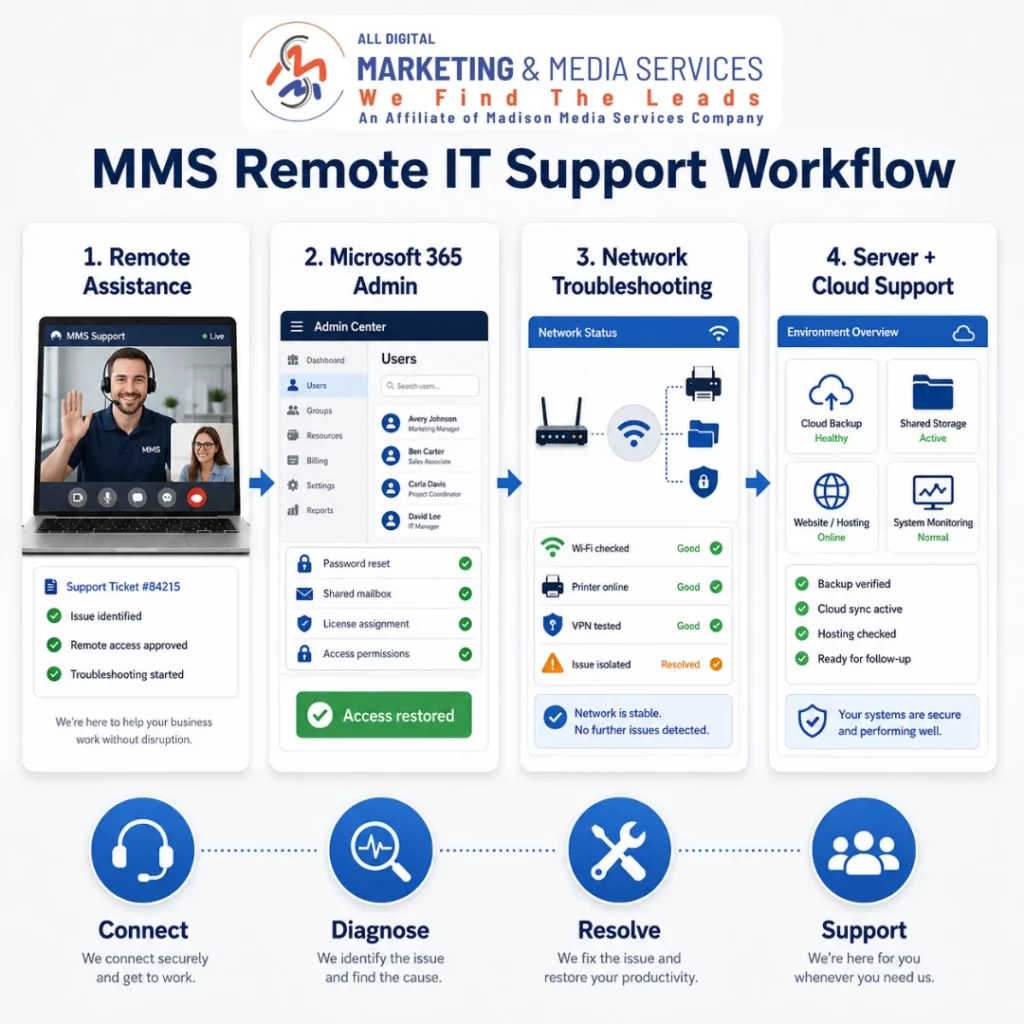
HOW REMOTE IT SUPPORT WORKS
From Technology Problem to Practical Next Step
Good troubleshooting starts by understanding what stopped working, who is affected, and what changed. Then the issue can be diagnosed in a logical order instead of creating more problems through guesswork.
01
Identify
Define the technology problem before changing systems.
We start with the affected users, devices, accounts, applications, network, website, or business workflow. That helps separate the symptom from the likely source.
02
Get Access
Establish the information and permissions needed to troubleshoot.
Depending on the issue, support may require user details, remote-access approval, admin credentials, provider access, DNS information, device information, screenshots, error messages, or vendor documentation.
03
Diagnose
Test likely causes in a controlled order.
The technician reviews the relevant settings, connections, permissions, services, logs, devices, or integrations. As a result, the next action is based on evidence rather than random changes.
04
Resolve
Make the approved correction when the issue fits the service scope.
The fix may involve account settings, email, networking, software, remote access, DNS, websites, hosting, cloud storage, printers, or another supported system.
05
Verify
Confirm that the affected workflow works again.
Testing should focus on the original problem. For example, the employee should be able to send email, access the shared drive, print, connect remotely, or complete the task that originally failed.
06
Document
Record useful information for the next support request.
Documenting the problem, relevant access, configuration, change, or next recommendation can reduce repeated troubleshooting and make future support more efficient.
07
Plan
Decide whether the business needs recurring support.
If similar issues continue, the next step may be better documentation, monitoring, account cleanup, equipment replacement, migration, backups, network changes, or an ongoing support arrangement.
WHAT BETTER IT SUPPORT SHOULD SUPPORT
What Should Better Business IT Support Actually Improve?
IT support cannot guarantee zero downtime, perfect security, permanent connectivity, or instant resolution of every technology problem.
Instead, a good support relationship should improve the areas a provider can influence directly: troubleshooting, access, documentation, configuration, communication, issue routing, and the process used to keep common business systems working.
01
Productivity
Reduce time lost to routine technology problems.
A faster path to troubleshooting can help employees return to the work that email, networks, printers, accounts, or devices were interrupting.
02
Access
Help employees reach the systems they are supposed to use.
Account administration, permissions, remote access, VPNs, shared storage, and cloud services can support more reliable access when they are configured appropriately.
03
Reliability
Create more consistency around common business systems.
Monitoring, maintenance, backups, documentation, and recurring support can improve the process around technology. However, no provider can guarantee that hardware, networks, vendors, or cloud services will never fail.
04
Clarity
Make technology responsibilities easier to understand.
Clear documentation and support scope help identify whether an issue belongs to MMS, an internet provider, software vendor, hardware vendor, or another specialist.
05
Scalability
Support technology as the business changes.
New employees, office moves, additional accounts, cloud systems, remote work, storage, websites, and integrations can create new support needs as a company grows.
SHOW THE SUPPORT WORK
IT Support Proof Should Explain the Problem and the Resolution.
A useful technology-support example does not need an exaggerated uptime claim or a dramatic cybersecurity graphic. It needs a real problem, real troubleshooting, and a supportable outcome.
Before publishing, replace the placeholders below with an approved MMS support example.

FEATURED IT SUPPORT PROJECT
Arlington Hardware Plumbing & HVAC
THE PROBLEM
Arlington Hardware Plumbing & HVAC needs more than occasional website updates. As an established plumbing, HVAC, well, and septic company serving multiple Wisconsin communities, its digital presence and day-to-day technology need to stay dependable while the team remains focused on serving customers. The website itself supports numerous service and location pages, quote requests, contact information, and ongoing content.
The broader challenge is keeping the business’s website, email, computers, software, and office technology working together without forcing staff to troubleshoot every technical problem themselves.
WHAT WE DID
Madison Media Services provides Arlington Hardware Plumbing & HVAC with an ongoing combination of website maintenance and practical business technology support.
Our work includes maintaining and updating the website, assisting with business email issues, performing on-site software and hardware updates, troubleshooting online and technology problems, and helping the company evaluate and purchase new equipment when upgrades are needed.
Rather than treating the website, email, computers, and other systems as completely separate projects, MMS provides a consistent support path for the technology the business relies on every day.
THE VERIFIED OUTCOME
Arlington Hardware Plumbing & HVAC has an ongoing support relationship with MMS covering both its customer-facing website and internal technology needs.
Its website remains active with current plumbing, HVAC, well, septic, location, contact, and quote-request content, while the business also has a defined resource for email support, equipment updates, hardware and software assistance, purchasing guidance, and other day-to-day technology issues.
ONE SUPPORT RELATIONSHIP → WEBSITE CARE + EMAIL + SOFTWARE + HARDWARE + EVERYDAY IT SUPPORT
SUPPORT AREA
Email • Network • Cloud • Server • Website
WORK COMPLETED
Diagnose • Configure • Migrate • Verify
OUTCOME
ONE SUPPORT RELATIONSHIP → WEBSITE CARE + EMAIL + SOFTWARE + HARDWARE + EVERYDAY IT SUPPORT
PLANNING IT SUPPORT
What Determines the Cost of Remote IT & Managed Support?
IT support cost depends on the number of users and devices, technology environment, support frequency, account administration, network complexity, servers, cloud services, backups, vendor coordination, and whether work can be completed remotely.
Therefore, a ten-person office using common cloud tools has a different support profile than a multi-location business with servers, specialized software, complex networking, and frequent support requests.
SUPPORT FACTOR
MORE FOCUSED SCOPE
ADDS MORE SCOPE
Number of Users & Devices
A small team has a manageable number of accounts, workstations, printers, and shared resources.
More employees, devices, offices, remote workers, shared systems, and user changes increase administration and support volume.
Technology Environment
The business uses common cloud tools and relatively simple network infrastructure.
Legacy servers, specialized applications, custom software, multiple offices, complex permissions, unusual hardware, or mixed environments add troubleshooting complexity.
Support Model
The business needs occasional remote troubleshooting or a clearly defined recurring service.
High request volume, dedicated help-desk expectations, after-hours needs, emergency response, guaranteed response targets, or extensive on-site work require a different support model.
Microsoft 365 / Google Workspace
A straightforward account environment needs routine administration and support.
Large migrations, tenant cleanup, complex permissions, shared resources, authentication changes, or multi-domain environments can require more planning.
Network & Remote Access
The office uses a straightforward router, Wi-Fi, and common remote-access setup.
Multiple sites, VLANs, complex firewalls, site-to-site VPNs, specialized security appliances, cabling, or hardware replacement can add scope.
Servers, Storage & Backups
The business has simple shared storage or cloud-based systems with clear requirements.
Servers, NAS devices, large data sets, retention policies, migrations, disaster-recovery requirements, or specialized backup systems require deeper planning.
Vendor Coordination
One primary system or vendor owns the affected service.
Problems that cross internet providers, software vendors, hardware manufacturers, website hosts, domains, Microsoft, Google, or other third parties can require additional coordination.
COMMON IT SUPPORT QUESTIONS
Questions Businesses Ask About Remote IT & Managed Support
IT support can cover many different systems, so scope matters. These answers clarify what can often be handled remotely, where on-site service may be needed, and what businesses should confirm before choosing ongoing support.
Do you provide remote IT support outside Wisconsin?
Yes. Madison Media Services states that many of its clients are in Wisconsin, while remote support is also available to businesses elsewhere in the United States.
Whether a specific issue can be handled remotely depends on the technology involved and whether physical access is required.
What types of IT problems can usually be solved remotely?
Many account, email, Microsoft 365, Google Workspace, software, permission, cloud, VPN, remote-access, DNS, website, hosting, and configuration issues can often be investigated remotely.
However, failed hardware, cabling, physical installations, some printer problems, and certain network failures may require on-site work.
Can you migrate our email to Microsoft 365 or Google Workspace?
Yes. The current MMS Remote IT page specifically identifies email migrations, account setup, DNS updates, Microsoft 365 administration, Google Workspace support, and ongoing account help.
The actual migration scope depends on the number of users, current provider, mailboxes, domains, data volume, permissions, timing, and any third-party systems connected to email.
Can you help with Wi-Fi, VPNs, routers, and firewalls?
Yes. Madison Media Services currently lists office-network troubleshooting, Wi-Fi issues, router and firewall setup, shared-drive access, remote-access configuration, and VPN assistance.
Complex networking, physical installation, cabling, specialized security appliances, or multi-site infrastructure may require additional planning or on-site support.
Do you support printers and other office devices?
Yes. Current services include printer troubleshooting, scanner setup, driver installation, network-printer configuration, and general office-device support.
Hardware failure or physical repair may still require the device manufacturer, replacement equipment, or a local hardware specialist.
Do you offer server, NAS, cloud storage, and backup help?
Yes. Madison Media Services currently identifies small-business server support, NAS setup and planning, backup solutions, shared-storage configuration, cloud-storage assistance, and remote monitoring.
Because backup and recovery requirements vary significantly, the exact retention, storage, recovery, testing, and responsibility model should be confirmed before relying on any backup service.
Is managed IT support the same as 24/7 help desk service?
Not automatically. The current MMS page says ongoing maintenance, monitoring, and support can be provided depending on business needs, but it does not publish a universal 24/7 help-desk promise or guaranteed response time.
Therefore, businesses should confirm support hours, response expectations, remote versus on-site coverage, emergency procedures, and recurring-plan inclusions before signing an agreement.
Can you support our website and business IT together?
Yes. The current MMS IT service includes website troubleshooting, DNS and domain issues, hosting assistance, website maintenance, SSL support, and uptime monitoring alongside broader technology services.
Businesses that need deeper recurring website care can also review the dedicated Website Maintenance & Hosting service.
LET’S BUILD WHAT’S NEXT
Ready to Grow Your Business Online?
Let’s build a smarter digital strategy designed to increase your visibility, generate more leads, and help your business grow.